


Mozilla has finalized the deployment of a comprehensive "master switch" within Firefox 148, allowing users to globally disable all generative artificial intelligence features. This control mechanism effectively wipes locally stored models and prevents the engagement of future automated enhancements, marking a distinct shift in browser architecture toward user-dictated privacy.
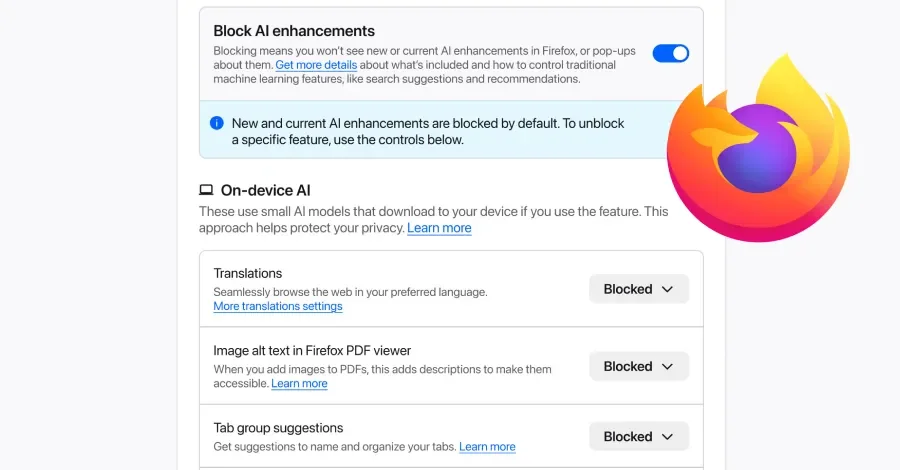
The new controls provide a centralized interface to toggle, monitor, or block specific AI-driven browser behaviors, including:

Content Generation: Automated link previews and sidebar integrations for models like ChatGPT, Claude, Gemini, Copilot, and Mistral.
Browser Organization: AI-enhanced tab grouping and automated metadata generation for PDF accessibility.
System Autonomy: Removal of on-device AI models for those opting out of the ecosystem entirely.
"It provides a single place to block current and future generative AI features in Firefox… This lets you use Firefox without AI while we continue to build AI features for those who want them." — Ajit Varma, Head of Firefox.
The Shift to 'Project Nova'
These controls serve as the technical foundation for the upcoming browser overhaul, codenamed Project Nova. While current AI management exists within the settings menu of version 148, the broader redesign—expected later this year—will integrate these switches into a modernized, rounded user interface.
The transition aims to reconcile the divergent demands of a user base split between those seeking automated productivity tools and those rejecting automated integration.
Read More: Chrome mimeHandler API lets extensions handle file types
Contextual Divergence
| Control Status | Functional Result |
|---|---|
| Available | Features remain visible and accessible |
| Enabled | User opts into specific functionality |
| Blocked | Interface elements removed; models purged |
This structural adjustment follows Mozilla's November 2025 announcement regarding opt-in AI implementation. By placing the "kill switch" at the center of the configuration, the organization frames the move as an issue of "pro-choice" design rather than an anti-technology mandate. As the browser moves toward the Project Nova aesthetic, the visibility of these privacy controls appears prioritized alongside cosmetic updates like restored compact mode and refreshed iconography.





